Skip to content

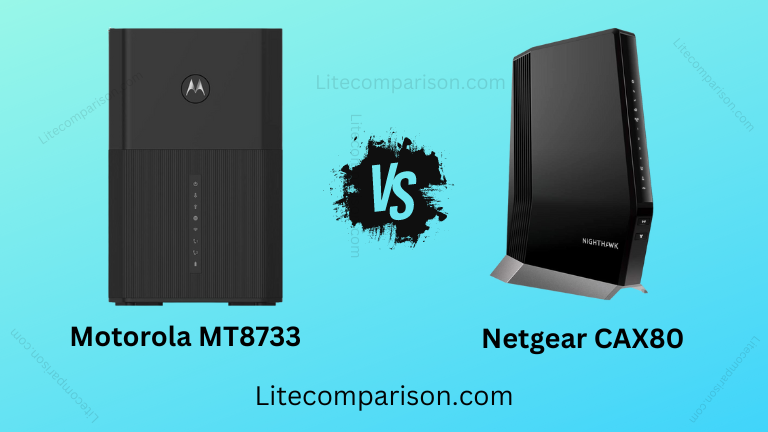
Motorola MT8733 vs Netgear CAX80 -CAX80 is Good one…?

    Motorola MT8733 WiFi 6 Router + Multi-Gig Cable Modem + 2 Phone Ports


    vs

    NETGEAR Nighthawk Cable Modem with Built-in WiFi 6 Router (CAX80)

    Motorola MT8733 vs Netgear CAX80

    Motorola MT8733 vs Netgear CAX80: Selecting an appropriate networking tool is essential if you want to improve your internet connectivity. In this article, we will compare the Motorola MT8733 to the Netgear CAX80. Which of these two gadgets is the better option, given their similar set of features and performance levels? Come along as we break down the pros and cons of each so you can choose the best option for your personal or company network.

    Motorola MT8733 vs Netgear CAX80 – Quick Comparison Summary

    • The Motorola MT8733 isn’t as famous as the Netgear Nighthawk CAX80, which is a cable modem with a built-in WiFi 6 router.
    • The Motorola MT8733 is less expensive than the Netgear CAX80, which costs more because it has more features.
    • The Motorola MT8733 has a WiFi 6 router, a multi-gig cable modem, and two phone ports. The Netgear CAX80, on the other hand, is a cable modem with a built-in WiFi router, but it doesn’t have any phone ports.
    • The Motorola MT8733 has 3×1 Gig Ethernet ports and 1×2.5 Gigabit Ethernet ports, while the Netgear CAX80 has 4×1 Gig Ethernet ports and 1×2.5 Multi-Gig LAN or Internet port.
    • The motosync app can be used to set up the Motorola MT8733’s smart mobile app in minutes. With the Nighthawk app, the Netgear CAX80 can be set up in minutes.
    • The Motorola MT8733 can cover up to 1,850 square feet, but the Netgear CAX80 can cover up to 2,500 square feet.
    • The Motorola MT8733 can cover up to 100 or more devices at once, while the Netgear CAX80 can cover up to 30 devices.
    • The Motorola MT8733 can go up to 2.5 Gbps, while the Netgear CAX80 can go up to 6 Gbps.
    • The Motorola MT8733 doesn’t have a USB port, but the Netgear CAX80 does. This USB port can be used with computers, game systems, and a lot more.
    • Through the Moto Sync app, parents can set rules for the Motorola MT8733.
    • Motorola MT8733 and Netgear CAX80 both have some great features in common, such as Wifi 6 AX6000, Smart App, Dual-Band, Next-Generation DOCSIS 3.1 Technology, Setup in Minutes, and much more.
    • The weight of the Motorola MT8733 is 3.61 pounds. The weight of the Netgear CAX80 is 4.45 pounds.
    • The Motorola MT8733 is 10 inches by 6.65 inches by 6.14 inches, while the Netgear CAX80 is 12.56 inches by 10.12 inches by 5.24 inches.

    Motorola MT8733 WiFi 6 Router + Multi-Gig Cable Modem + 2 Phone Ports

    NETGEAR Nighthawk Cable Modem with Built-in WiFi 6 Router (CAX80)

    Motorola MT8733

    Netgear CAX80

    FEATURES

    Brand

    Motorola

    NETGEAR

    Parental Control

    YES

    NO

    Number of Ports

    3X1 Gig Ethernet ports

    4X1 Gig Ethernet Ports

    2.5 Gigabit Ethernet port

    Wifi 6 AX6000

     Smart App

    Next-Generation DOCSIS 3.1 Technology

    YES

    YES

    2 Phone Ports

    YES

    NO

    wifi coverage

    1850 square feet

    upto 2500 square feet

    Device coverage

    upto 100+ devices

    upto 30 devices

    delivers speeds

    upto 2.5 Gbps

    upto 6 Gbps

    USB port

    NO

    1 x USB 3.0

    Weight

    3.61 pounds

    4.45 Pounds

    Dimensions

    10 x 6.65 x 6.14 inches

     12.56 x 10.12 x 5.24 inches

    FAQS :

    I have Comcast Triple Play and intend to downgrade to Comcast internet just with my Ooma phone. Is this a good option for making this transition?

    Answer: I have Comcast/Xfinity Triple Play as well. When I added the phone and upgraded to Triple Play three years ago, it cost me $159.00 per month with all of the premium channels. My monthly cost had increased to $292.00 per month late last year, and they were discussing another $18 increase. I cancelled all of the premium channels, returned one of the three HD adapters, and purchased this MT17711 to avoid having to rent one on a monthly basis. My charge was reduced to $191.30. This modem is fantastic. It has quicker Internet connections, and my outside gadgets no longer drop out. I keep the X1 DVR and can go without the premium channels. Installation was straightforward and completed entirely online, eliminating the need to contact Xfinity.

    I recently upgraded my account to the 1000 mbps plan and would like to make the most of it. Will this gadget allow me to download at 1000 Mbps?

    Answer: I recently upgraded from older equipment that only supported 200 mbps. My speed is 400 mbps, and I've noticed an improvement. With the $400 service, I was restricted to $200. I should be able to upgrade because this Motorola device supports 600 MHz. Although it should be capable of 1000 mbps, there is definitely a bottleneck limiting it to 600 mbps; therefore, I would say this is not the equipment for 1000 mbps.

    Mt7711 switches from bridge mode to eroute_dualmode at reboot or when prompted by Xfinity. Has anybody discovered a way to keep it in bridge mode?

    Answer: Your internet service provider is completely responsible for bridging the connection. Some service providers include a configuration file that overwrites the bridge mode every time you reboot your modem (when your modem or gateway connects to their DHCP server, it locks to your modem's MAC address). You can contact your internet service provider and request that they release your DHCP lease, which will force the network to relearn which MAC is linked with your account. However, it is possible that this may not be permanent and that the prior settings will be restored. If you have any more questions, please contact our customer service department at 1-800-753-0797 (Monday–Friday 8:30 a.m.–10 p.m., Saturday 8:30 a.m.–5 p.m. Eastern Time).

    Is this AT&T-compatible?

    Answer: The MT7711 or any DOCSIS cable modem or router is not AT&T compatible.

    Will this modem operate with Comcast, Xfinity, or X1 bundled services and home security?

    Answer: Comcast has tested and certified the Model MT7711 to function with their services, including home security.

    I notice a lot of people inquiring about routers and getting replies that state "modem only," while the descript